SEO & AEO
Escape Room SEO: A Complete Guide to Rank First in Your City
Last Updated on • Escape Room Marketer

No doubt, your escape rooms are fantastic! But you’re still frustrated because not enough people know you’re there, you don’t appear in local search, your weekday slots remain empty, and “we’ll book later” keeps turning into “never”.
That’s exactly where escape room SEO steps in—helping the right players find you when they search “fun tonight”, “team building near me”, or “birthday ideas for teens”!
In this guide, we’ll show you how to map search terms to the right pages, fine-tune your Google Business Profile, structure your room and event pages for better conversions, collect reviews that boost your rankings, and speed up your site so booking feels effortless.
You’ll also get checklists, copy-and-paste templates, and clear benchmarks to help you identify what to fix first—and how to measure your progress.
By the end, you’ll have a confident, step-by-step roadmap to fill slow hours, climb rankings, and turn more searches into bookings—with proven SEO strategies that actually work!
What is escape room SEO?
Escape room SEO is a set of steps that helps your rooms appear on Google Search and Maps for searches like “escape room near me” and “team building in [city].” It turns your room, event, and location pages into clear answers—so more people find you and book.
SEO and Marketing Terms Cheat-Sheet
Not familiar with marketing jargon? No worries. This 30-second cheat sheet translates the acronyms and buzzwords in this guide into plain English. Skim it now, and the rest of the guide will be a piece of cake!
- GBP: Your Google Business Profile—the listing that shows in Google Maps.
- GSC: Google Search Console—tells you what people searched to find your site.
- SERP: Search engine results page—the Google page showing results for a query.
- Map Pack: The 3 map results shown above normal results for local searches.
- CTR: Click-through rate—how often people click when they see you.
- CVR / Conversion rate: The % of visitors who actually book (or call).
- Core Web Vitals (LCP / INP / CLS): Google’s speed & stability scores (load time, responsiveness, layout shift).
- UTM: A short tag added to links (e.g., from GBP) so you can track where clicks came from.
- Schema / JSON-LD: Extra code that labels your pages for Google (e.g., FAQs, products, breadcrumbs).
- NAP (or NAP+H): Name, Address, Phone (+ Hours)—must match exactly across listings.
- Canonical: A tag that tells Google which duplicate page is the “main” one.
- PAA: People Also Ask—Google’s common-question boxes; great FAQ ideas.
- CTA: Call to action—your “Book Now,” “Check times,” or “Call us” button.
- Breadcrumbs: A small path at the top of a page (Home → City → Room) that helps users (and Google) navigate.
Foundations That Make Escape Room SEO Work
Before chasing advanced wins, let’s lock down the fundamentals that turn clicks into bookings. Clear branding, clean structure, fast pages, and obvious “Book Now” cues are the groundwork that makes SEO for escape rooms pay off.

Think of this as tightening the bolts so every other tactic actually moves the needle!
- Brand clarity: One voice, consistent NAP (name, address, phone), and the same hours everywhere.
- Crawlability: Simple URLs (/albany/escape-rooms/black-ops/), XML sitemap, robots.txt, no orphan pages.
- Clean design: Fast-loading pages, readable text, clear “Book Now” buttons.
- Conversion clarity: Prices or price range, team size, difficulty, age rules, parking info.
- Trust signals: Real photos, staff bios, awards, safety notes, and recent reviews.
Pro Tip: If a first-time visitor can’t answer “What do you offer, where, for how much, and how do I book?” in 10 seconds of visiting a page, fix the page before writing more content. To learn more about SEO-friendly escape room websites, explore our in-depth blog post on SEO web design.
Do this now (5 min):
- Open your homepage: can a stranger see what/where/price/how to book in 10s? If not, add a line with city + price range.
- Check your footer: confirm Name, Address, Phone, and Hours match your storefront.
- Add a clear “Book Now” button above the fold on desktop and mobile.

Feeling unsure where to begin? Start small, stay steady.
You don’t have to master everything at once. Focus on one improvement each week—and let progress build naturally. And if you ever feel stuck, remember—you’re not alone. We’re always here to help you move forward.

Your 90-Day Escape Room SEO Plan
You don’t need a massive budget or a marketing degree—you need a clear, do-able game plan that fits between resets and team briefings.
This 90-day roadmap turns escape room SEO into simple weekly actions: what to publish, where to optimize, and how to measure wins without drowning in dashboards.
Follow it step by step, and you’ll trade slow weekdays for steady bookings—building momentum you can actually feel in your calendar!
1) SEO Keyword Research for Escape Rooms
Before you write a word, list the exact phrases people type right before they book—this is the foundation of search engine optimization for escape rooms. The goal is simple: match real buyer intent to the right page (rooms, events, locations), so Google sends you ready-to-book visitors instead of browsers.
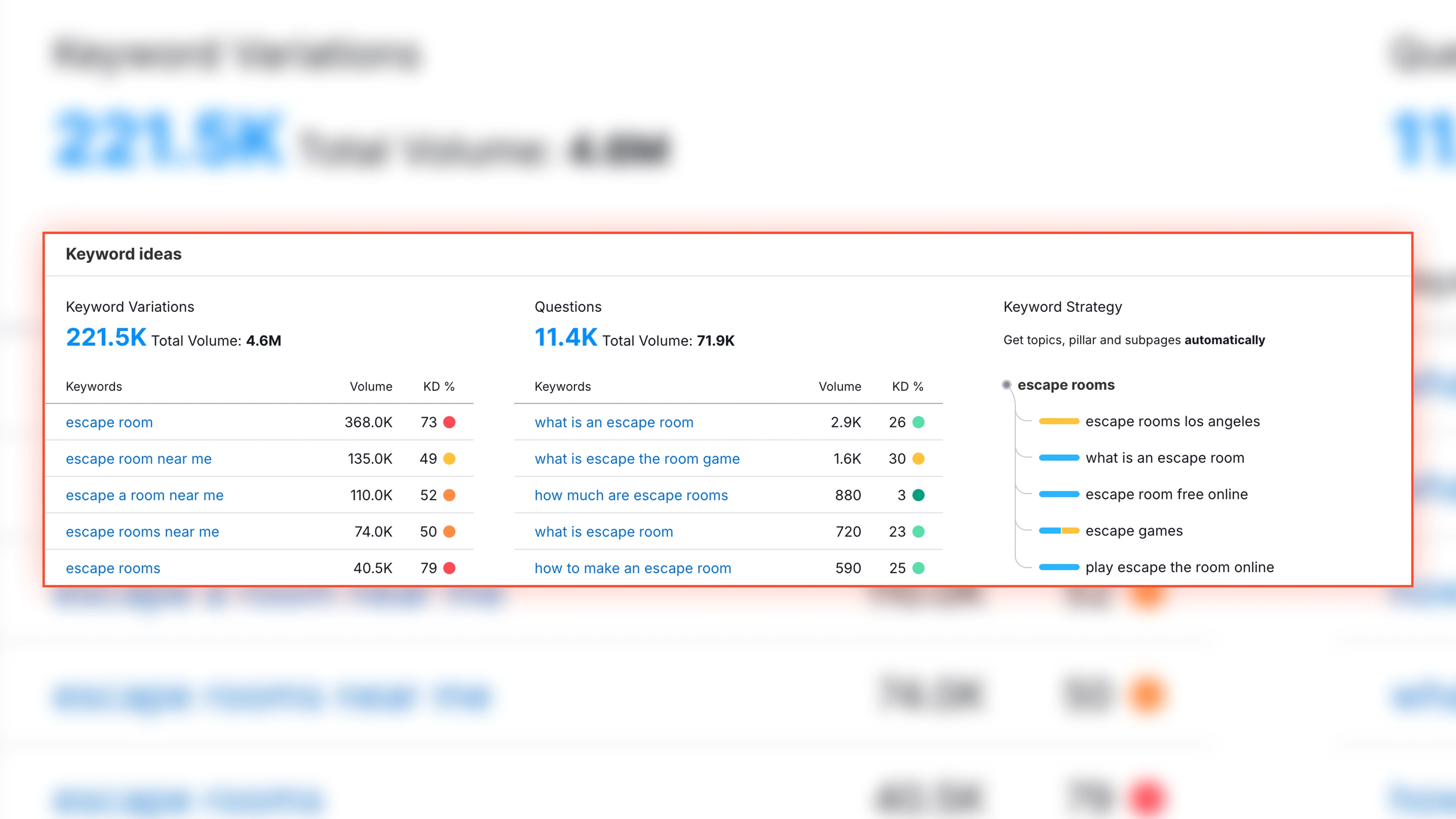
Think of it as your content GPS: clear targets, fewer detours, more bookings!
Field-tested workflow
- List your page types (your “clusters”): Rooms, Events (corporate, birthdays, school trips), Locations, Gift Cards, Pricing, FAQs. Clusters tell you which keywords belong to which page type.
- Add the common local “patterns”:
“escape room near me”
“escape room [city]”
“team building [city]”
“birthday party [city]”
These are the high-intent phrases most people use before booking.
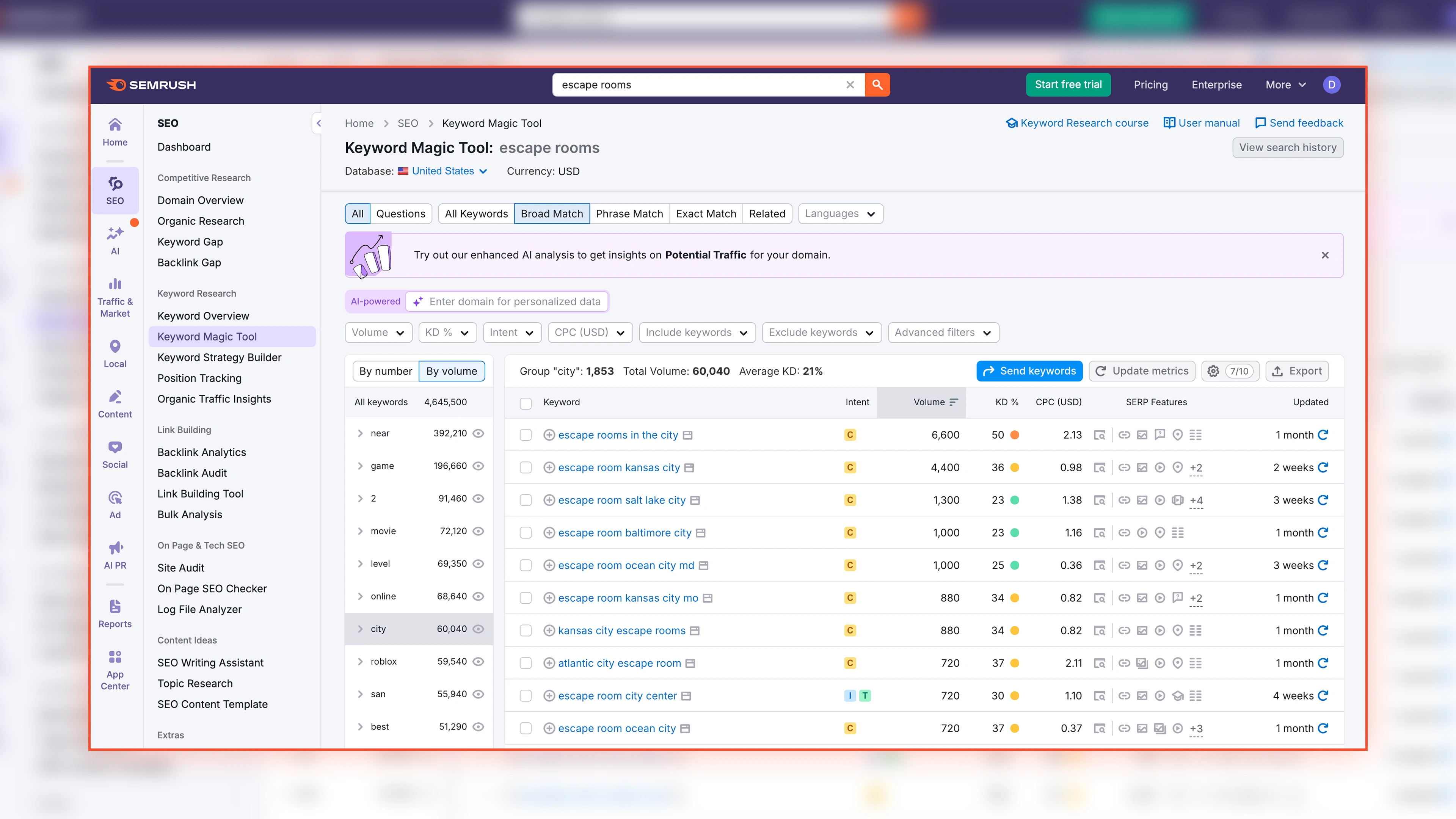
- Keywords per page: Assign 1 primary keyword + 2–3 close variants per page. It keeps the page focused (no cannibalization), and tells Google exactly what the page should rank for.
- Capture real questions in your FAQs: Use genuine search phrases like “What is an escape room?”, “How many players?”, “What age?”, “Is it scary or easy?”, “How much?”, or “Is there parking?”—these are long-tail keywords that win Featured Snippets and convert curious visitors. Add 5+ of these FAQs to your key pages to target more question-based searches and boost visibility.
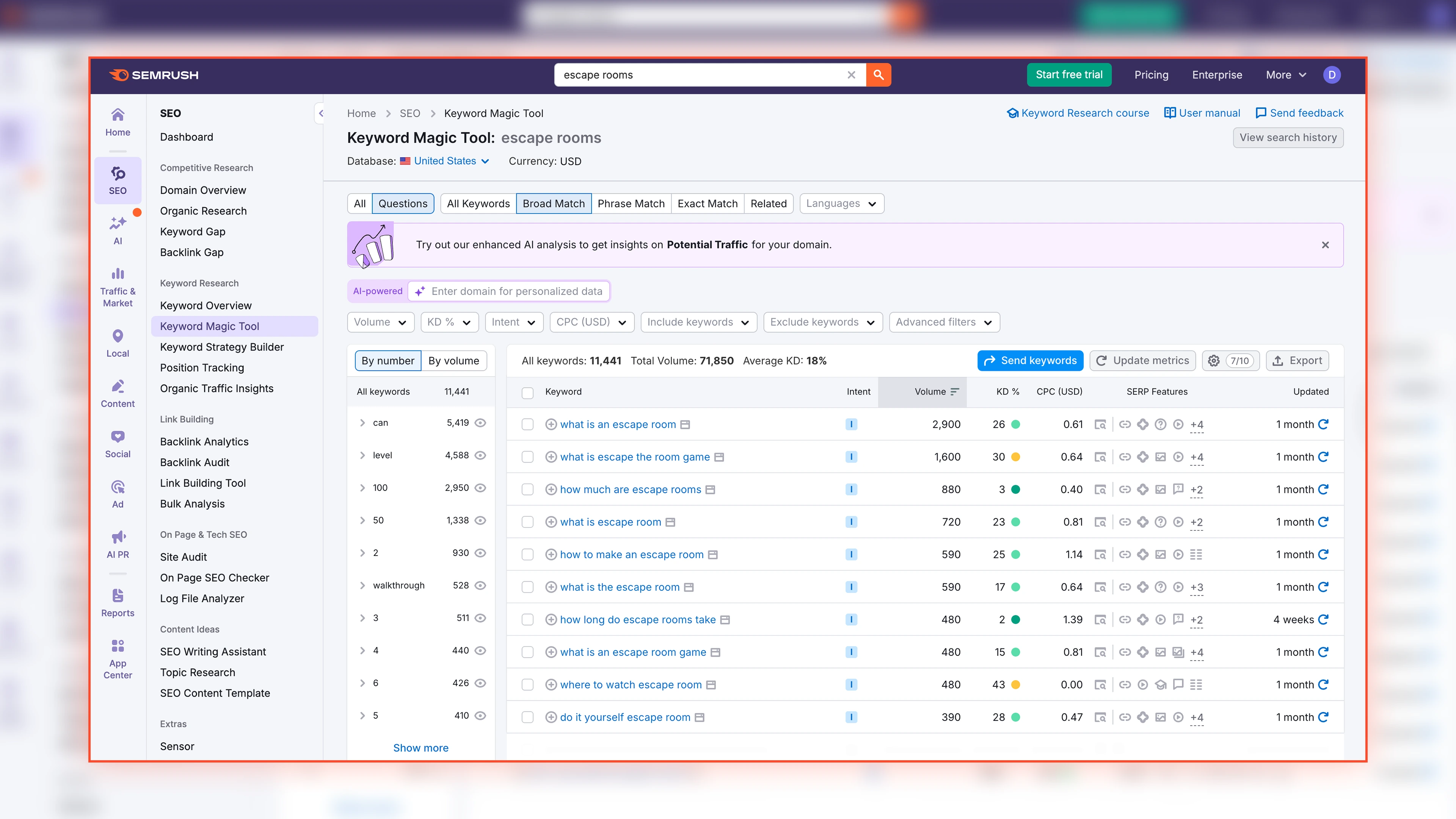
- Use your keywords in headings (H2/H3): Headers help both Google and visitors understand sections—no stuffing, just natural use.
Here’s a mini intent map:
| Page | Primary Keyword | 2–3 Variants | Add These FAQs |
|---|---|---|---|
| Location – Albany | escape room Albany | escape room in Albany, escape room near me | Parking? Age limits? Price? |
| Event – Corporate | team building Albany | corporate team building Albany, company outing Albany | Group size? Private room? Catering? |
| Event – Kids Birthday | kids birthday party Albany | escape room birthday Albany, birthday ideas Albany | Min age? Chaperones? Party room? |
| Room – Zombie Lab | zombie escape room Albany | scary escape room Albany, 60 minute escape Albany | Difficulty? Team size? Hints? |
| Pricing | escape room pricing Albany | how much is an escape room Albany | Per person? Refunds? Discounts? |
Helpful tools (pick 1–2): Google Ads Keyword Planner, Keyword Magic Tool, Moz Keyword Explorer, WordStream, Google Trends, your own GSC “Queries.”
Pro Tip: If two pages target the same primary keyword, one will steal traffic from the other. Give each page one clear primary term and link related pages together.
Do this now (5 min):
- List 5 pages: Home, City, Top Room, Corporate, Pricing.
- Assign 1 primary keyword to each (e.g., “escape room [city]”, “team building [city]”).
- Add 3 FAQs you hear daily to the City page draft.
For a deeper dive into keyword research, check out our guide on step-by-step SEO keyword research.
Not sure which keywords to focus on? Start with your players’ words.
Listen to how guests describe your rooms—that’s the language they search in. And if you’d like guidance on turning those insights into results, schedule a free consultation. We’re right here to help.
2) Information Architecture (One Intent = One Page)
When every page serves one clear purpose, both players and Google instantly know where to go. This is practical SEO for escape rooms—build one page per room, location, and event, all linked through a simple menu and breadcrumb trail so visitors naturally flow toward “Book Now” button.
Build it this way
- One page per room (unique photos, story, difficulty, team size, CTA).
- One page per location (address, map embed, hours, parking).
- One page per event type (corporate, birthdays, date night, kids, teens).
- Global pages for Pricing, Gift Cards, and FAQs.
- Add breadcrumbs and keep the menu simple.
- Create a Rooms hub and link every room page from it.
Mini-framework
- Home → Locations → [City] → Rooms → [Room]
- Home → Events → Corporate / Birthdays / School Events
Pro Tip: Run the 2-click test—from Home, a first-time visitor should reach any room or event page in two clicks or less (Home → City → Room/Event). If not, simplify the menu, add a Rooms hub, and wire in breadcrumbs.
Do this now (5 min):
- Sketch the path: Home → City → Room.
- Add a Rooms hub link to your main nav.
- Verify every room has (or will have) its own URL.
3) On-Page SEO for Escape Rooms (Titles, Metas, Headers, Copy)
Titles win the click, headers keep attention, and clear copy points guests to “Book Now.” These are practical escape room SEO tactics you can apply page by page—tight titles, benefit-led metas, matching H1s, short intros, and smart internal links that guide visitors straight to checkout.
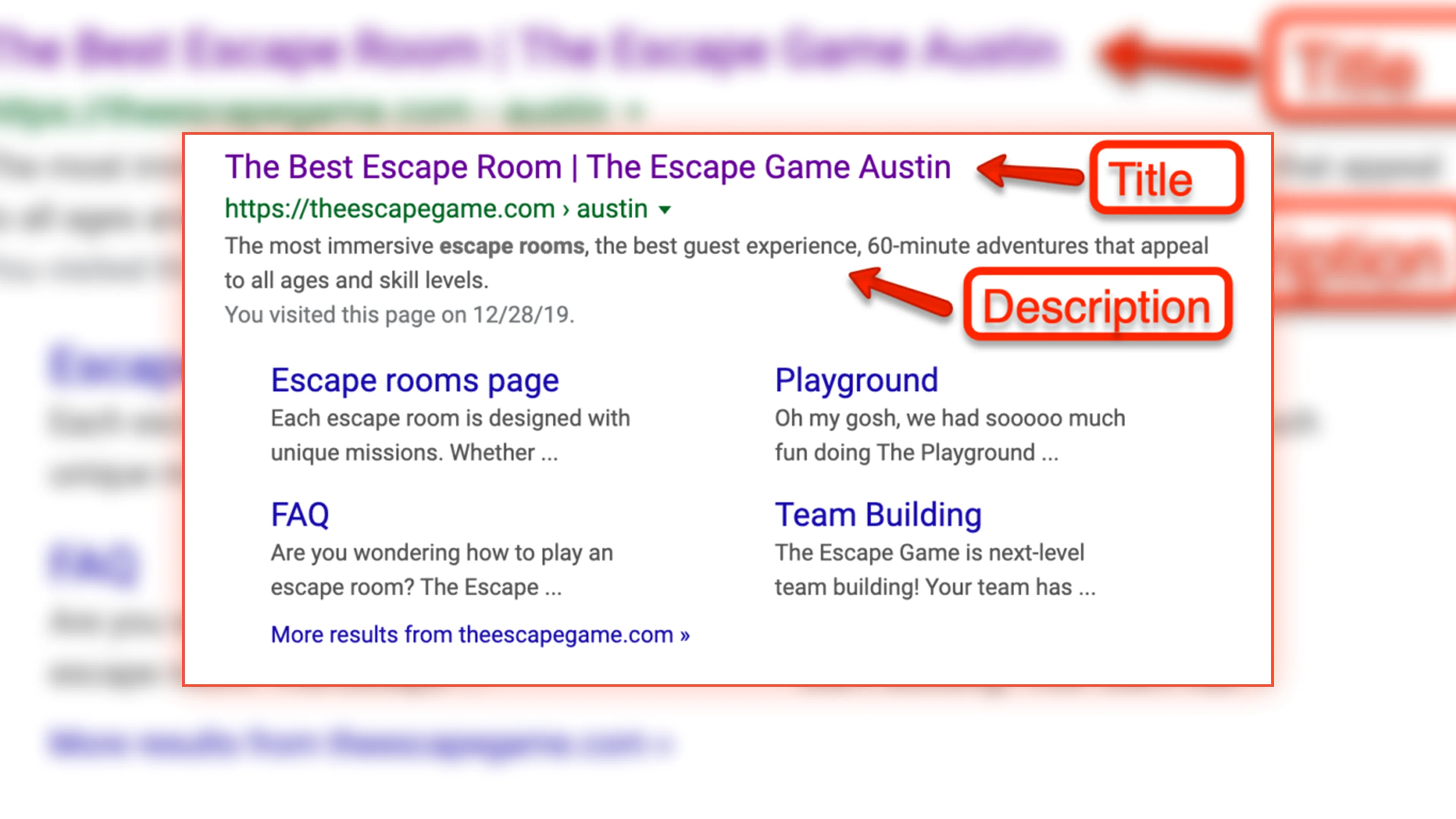
Room Page SEO Template (copy-ready)
Use the following template for every room page so search engines understand the page and guests can book quickly!
- Meta title: [Room Name] Escape Rooms in [City] | [Brand] (Keep the title under 60 characters; use the primary keyword in it)
- Meta description: Add benefit + CTA: “Teams of 2–10. Family-friendly. Book online in seconds.” (Keep the description under 155 characters; use the primary keyword in it)
- H1: Match page intent, use the primary keyword in it (e.g., “Corporate Team Building in [City]”).
- Intro paragraph: 2–3 lines that promise value, then CTA.
- Section H2s: Story, How It Works, Team Size & Difficulty, Pricing, FAQs, Photos.
- Internal links: From rooms → events → FAQs → booking.
- FAQ block (sample Qs): age, accessibility, reschedule policy, parking, arrival time.
- Images: export to WebP; write descriptive alt text (e.g., “Wizarding School escape room in Albany, potions classroom set, 2–8 players”).
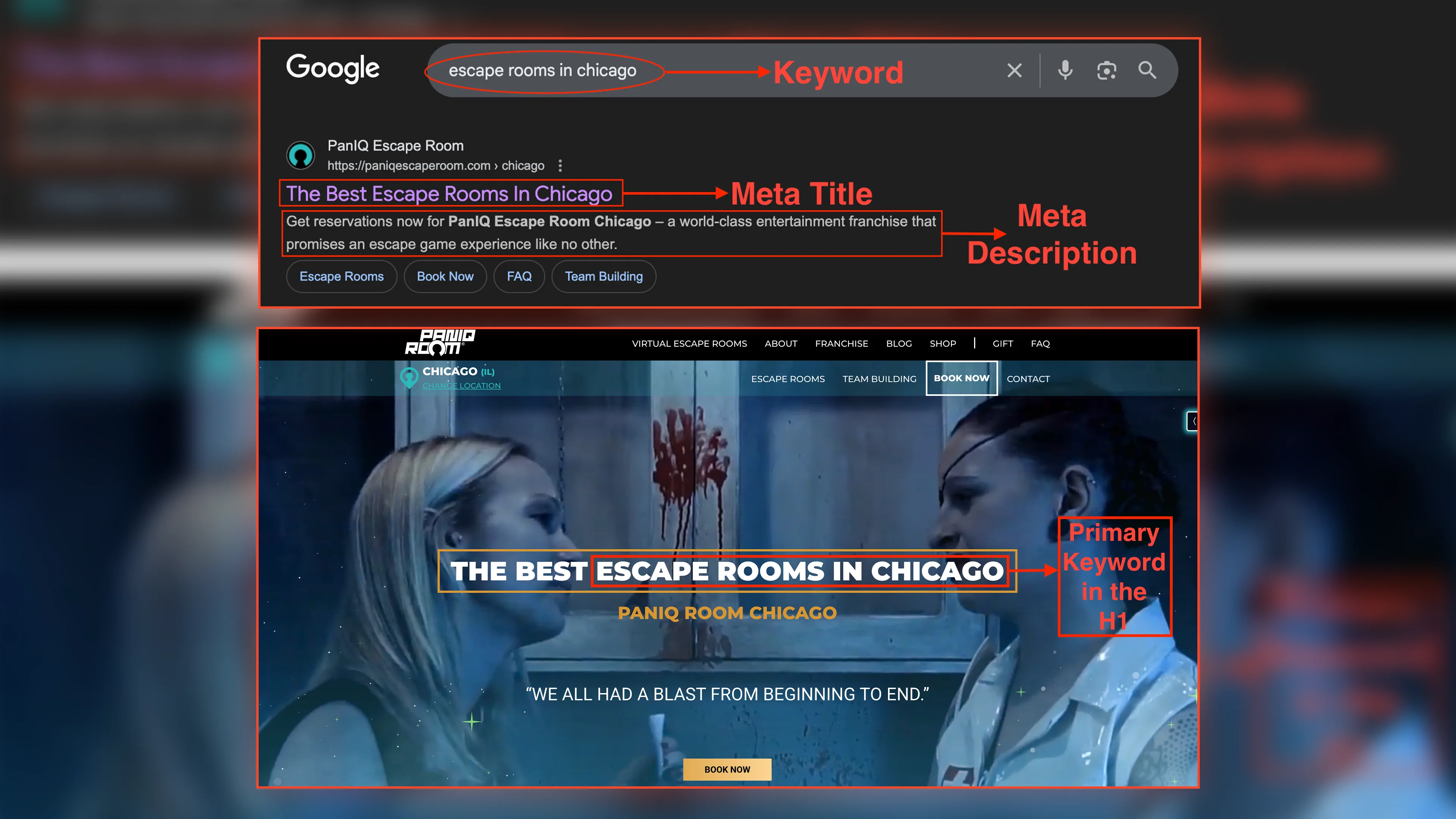
Pro Tip: Think of every room page as a mini sales pitch to both Google and your players. If your title, meta, and intro clearly answer what it is, where it is, and why it’s fun, you’ll rank higher and convert more visitors into bookings.
Do this now (5 min):
- Rewrite one title tag: “[Room Name] Escape Room in [City] | [Brand]”.
- Add a meta description with benefit + CTA (≤155 chars).
- Add one internal link from a room page to your Corporate page.
4) Local SEO and Google Business Profile (GBP)
Most first-time players discover you on Google search results or Google Maps, not your homepage.
Your Google Business Profile is where photos, Products (each room on GBP should be added as a GBP Product), reviews, and Posts turn nearby searches into calls, clicks, and directions—fast.
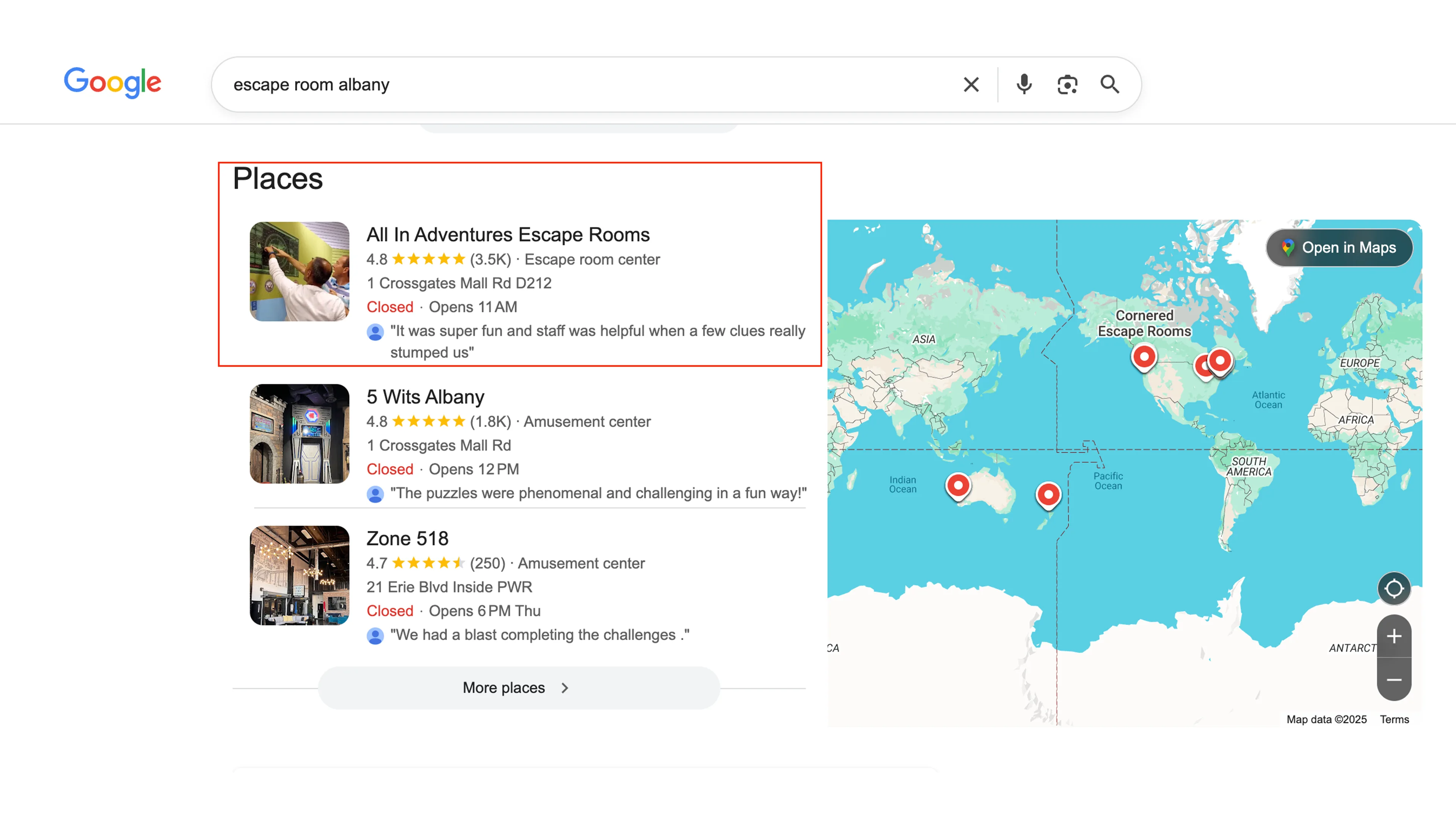
Treat GBP as the heartbeat of your local presence and make it a top priority in your SEO strategies for escape rooms.
Set it up (once)
- Primary category: Escape room center (or the closest match in your country).
- Secondary categories (optional): Tourist attraction, Amusement center (if relevant).
- Basics: NAP (Name/Address/Phone), hours, holiday hours, website, appointment/booking link.
- Attributes: kid-friendly, groups, wheelchair access, etc. (what applies).
- Messaging: turn on, and respond quickly.
Make rooms show up (add each room as a GBP Product)
- Photo (1200×900, no spoilers)
- Room name + short theme line
- Duration, difficulty, team size
- Price range (or “from $X”)
- Link to that room page with UTMs
What ranks in the Map Pack?
We searched for the keyword “escape room [city]” in five U.S. cities on 18th October, 2025, and identified the escape rooms that ranked first on the Google Map Pack. This small, directional sample reveals what top performers typically have in common.
| City | Keyword | Rank #1 (name) | Reviews | Avg rating | New photos (in the last 90 days) | Rooms listed as “GBP Products” | Booking link on GBP profile | Q&A answered |
|---|---|---|---|---|---|---|---|---|
| Austin, TX | escape room Austin | The Escape Game Austin | 15,926 | 5.0 ★ | Yes | Yes | Yes | Yes |
| Denver, CO | escape room Denver | EscapeWorks Denver - Convention Center | 4,726 | 4.9 ★ | Yes | Yes | Yes | Yes |
| Orlando, FL | escape room Orlando | The Escape Game Orlando | 24,351 | 5.0 ★ | Yes | Yes | Yes | Yes |
| Seattle, WA | escape room Seattle | Puzzle Break | 4,543 | 5.0 ★ | Yes | Yes | Yes | Yes |
| Phoenix, AZ | escape room Phoenix | Puzzle Effect Escape Rooms - Phoenix | 1,824 | 4.9 ★ | Yes | Yes | Yes | Yes |
Here’s how we measured:
- What we typed: We searched “escape room [city]” (for example: escape room Austin).
- When we checked: All searches were done on the same day within a 2-hour window (we note the date/time in UTC, a universal time zone).
- How we searched: We used a logged-out browser (no Google account) and set the search location to the city center.
- Devices we tried: We checked on desktop and mobile.
- If results differed: We picked the business that showed #1 most often across checks (or, if tied, the one closest to the city center on the map).
Note: Map Pack results often change by time and where the searcher is standing. Treat the table above as a directional snapshot—it doesn’t represent permanent rankings.
Now, following the same methodology explained above, let’s examine the Map Pack for a single location—Austin, TX—by searching the keyword “escape room Austin” on the same date and from the same location. The following data table shows what we found and highlights the key factors that make the difference among the top three ranked escape rooms.
| Ranking | Escape Room name | Reviews | Avg rating | New photos (in the last 90 days) | Rooms listed as “GBP Products” | Booking link on GBP profile | Q&A answered |
|---|---|---|---|---|---|---|---|
| #1 | The Escape Game Austin | 15,926 | 5.0 ★ | Yes | Yes | Yes | Yes |
| #2 | Escape Hour Austin | 1,825 | 4.9 ★ | Yes | Yes | Yes | No |
| #3 | 4 Dreams Escape Game - Austin | 643 | 5.0 ★ | Yes | Yes | Yes | No |
Observation: 4 Dreams Escape Game holds a perfect 5.0★ rating but only 643 reviews and inconsistent Q&A responses, keeping it in 3rd place on the Google Map Pack. Escape Hour Austin, with a slightly lower 4.9★ rating but a higher review count, ranks 2nd. The Escape Game Austin dominates the top spot with the most reviews, a strong 5.0★ average, and active engagement across all ranking factors.
Pro Tips: Use these quick, owner-friendly moves to boost your Map Pack visibility—just like the top-ranking escape rooms in the table above—and turn more local searches into real bookings:
- Post one update, upload 1–2 fresh photos, and answer new Q&A entries every week. Also, verify your business hours and holiday hours weekly to avoid showing inaccurate or closed times to searchers.
- Upload 3–5 real, geo-tagged photos monthly (teams, lobby, props, staff) using your room name and city name in captions for stronger local signals. Avoid using stock photos.
- Seed 5–7 common questions (parking, age limits, difficulty, accessibility, late arrivals) and keep answers updated monthly.
- Aim for 10–20 new Google reviews per month per location and maintain an average rating around 4.9★. Reply to every review within 48 hours—mentioning the room name and city to boost local relevance.
- Point the Booking/Website link to your best-converting page (e.g., location or top room page), not a generic homepage.
- Track GBP Insights (clicks, calls, directions) plus room-page conversion rates, and compare quarterly with top local competitors, and build local backlinks from partners like hotels or tourism boards.
To learn more about leveraging GBP for local visibility, read our in-depth blog post on Google Business Profile optimization.
Do this now (5 min):
- In Google Business Profile, upload 1 new real photo.
- Add or fix your Booking/Website link to your best city/room page (with UTMs).
Create 1 Product for your top room (with image, duration, team size, price range).
Your Google listing is your digital front door.
Keep it warm, current, and welcoming—with real photos, quick replies, and accurate info. Little updates each week make a big impact over time.
5) Content That Converts (Hubs, FAQs, and Guides)
When a guest lands on your site, they’re asking, “Is this right for us—and how do we book?” Helpful, buyer-focused pages answer those questions quickly and guide visitors straight to checkout—and Google rewards those pages with higher visibility.

So, build simple guides, event hubs, and FAQs that remove doubts, earn trust and bookings.
Publish these first:
- Corporate team building guide (meeting room options, capacity, catering).
- Birthday party pages (kids, teens, adults) with packages and add-ons.
- How it works (arrival, briefing, gameplay, photos).
- FAQs mega page (age, pricing, difficulty, accessibility, parking).
- Add short videos (30–60 seconds) showing lobby, briefing, and smiles after the game.
Pro Tip: Use real photos of your rooms and teams. Stock images don’t earn trust.
Do this now (5 min):
- Add a Pricing snippet (from $X pp) on each room page.
- Draft 3 bullets for a “How it works” section (arrive, brief, play).
- Place 2 recent reviews near the first “Book Now” on your top room page.
6) Reviews and UGC for Escape Rooms
User-generated content (UGC) and reviews are the fastest way to build trust with new players, as well as Google.
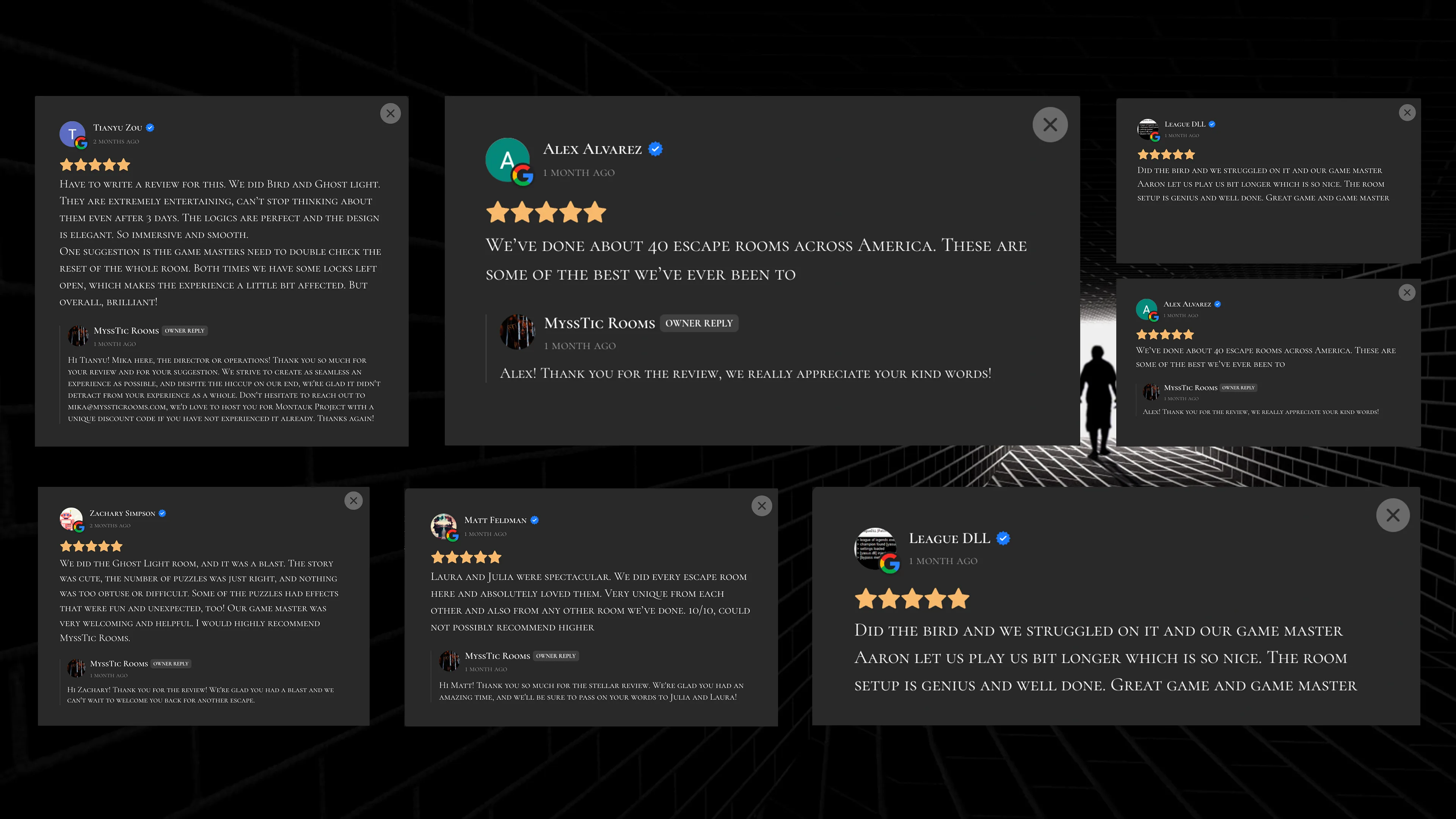
A simple, repeatable routine that nudges happy teams to share their experience (and showcases those words on key pages) will lift visibility and conversions—practical SEO tactics for escape rooms that pay off every week.
The simple SOP (do this every game day)
- QR at exit: After the debrief/photo, point teams to a review QR (Google link).
- 1-hour message: Send a friendly SMS/email with the review link.
- 24-hour reminder: One gentle nudge for folks who missed it.
- Show it off: Feature the best reviews on the homepage, room pages, and location pages.
- Say thanks: Reply to every review within 48 hours (mention room + city naturally).
- Ask for UGC: Invite teams to post their group photo/video and tag your handle/hashtag.
- Keep consent simple: Verbal “yes” for reposting, or a small sign by the photo wall: “By posing, you’re happy for us to share.”
Review Request (copy-ready template)
1-hour SMS/email:
“Thanks for playing [Room Name]! If you had fun, a quick Google review helps other teams in [City] find us: [short link]. What did your team enjoy most?”
24-hour reminder:
“Still thinking about your escape? We’d love your quick review: [short link]. Thanks for helping other teams in [City] find us!”
Where to showcase (and why)
- Homepage: Social proof near the first CTA = higher clicks to “Book Now.”
- Room pages: Reviews that mention the specific room boost conversions.
- Location pages: Reviews that mention city/parking/staff help local trust (and rankings).
Extra UGC ideas (easy wins)
- Monthly photo contest: “Best Team Pic” → prize = gift card.
- Hashtag: Short and unique (e.g., #Escape[City]).
- Wall of Fame: Add winning photos to the room page gallery.
- Shorts/Reels: 10–15s “We escaped!” clips (no spoilers).
Pro Tip: Reviews that mention your room name + city often rank for long-tail searches and improve click-through in Maps—coach lightly, never script.
Do this now (5 min):
- Print/post a QR code to your Google reviews at the photo wall.
- Paste the 1-hour + 24-hour review request templates into your SMS/email tool.
- Reply to the last 3 reviews by name, mention room + city.
Got a few extra minutes? Check out our full article on The Role of User-Generated Content for Escape Rooms in Facebook Ads.
7) Local Link Building and Partnerships
Google trusts what your city trusts. When hotels, tourism boards, schools, and coworking spaces link to you, it’s a public vote that you’re the go-to experience—great for weekday demand and brand credibility.

This is SEO for escape rooms at its simplest: plug into the local ecosystem, create useful resources or offers, and let trusted neighbors vouch for you.
Targets:
- Hotels, tourism boards, event calendars, colleges/schools, HR blogs, coworking spaces, corporate newsletters.
- Offer exclusive packages or discount codes for their audiences.
Checklist
- Identify 10 local targets (hotels, CVB/tourism, HR blogs, schools).
- Aim for 1 new partner link per month
- Offer a weekday package or fundraiser and a simple partner blurb.
- Sponsor a small community event per quarter
- Offer a “team-building checklist” PDF they can link to
Pro Tip: Create a “Partners” section on your homepage and every city/location page. Showcase logos of nearby businesses and organizations you collaborate with — hotels, tourism boards, schools, coworking spaces, or HR blogs.
Do this now (5 min):
- List 3 nearby hotels/schools/coworking spaces to contact.
- Write a one-liner offer: “Weekday team-building code HOTEL15.”
- Add a Partners logo strip to your City page (even if it’s “coming soon”).
Big SEO wins often start with local connections.
Partner with nearby schools, hotels, or coworking spaces—and let those relationships naturally amplify your visibility and trust in the community.
8) Schema and Entities (Give Search Engines the Labels)
Schema is the label-maker for your website—clear tags that tell Google what each page is about and how it all connects. Adding the right JSON-LD (business, rooms, FAQs, breadcrumbs) strengthens SEO by turning your content into machine-readable facts that can unlock rich results and more qualified clicks.

Add JSON-LD:
- LocalBusiness on location pages (name, address, phone, hours, map URL).
- Product for each room (name, image, description, price range).
- FAQPage on FAQs.
- BreadcrumbList site-wide.
To make implementation easy, here are ready-to-use Schema code samples:
Feel free to download these samples, copy, and use them as templates—just remember to update the brand name, room name, location, pricing, and other details to match your own escape room business.
Tool Tip: Validate with Google’s Rich Results Test before shipping.
Do this now (5 min):
- Paste LocalBusiness JSON-LD on your City page (fill in NAP+H).
- Paste Product JSON-LD on your top room page (image, price).
- Run Google’s Rich Results Test once to spot errors.
9) Technical SEO and Core Web Vitals
If a page feels slow or jumpy, guests bounce—and Google notices.
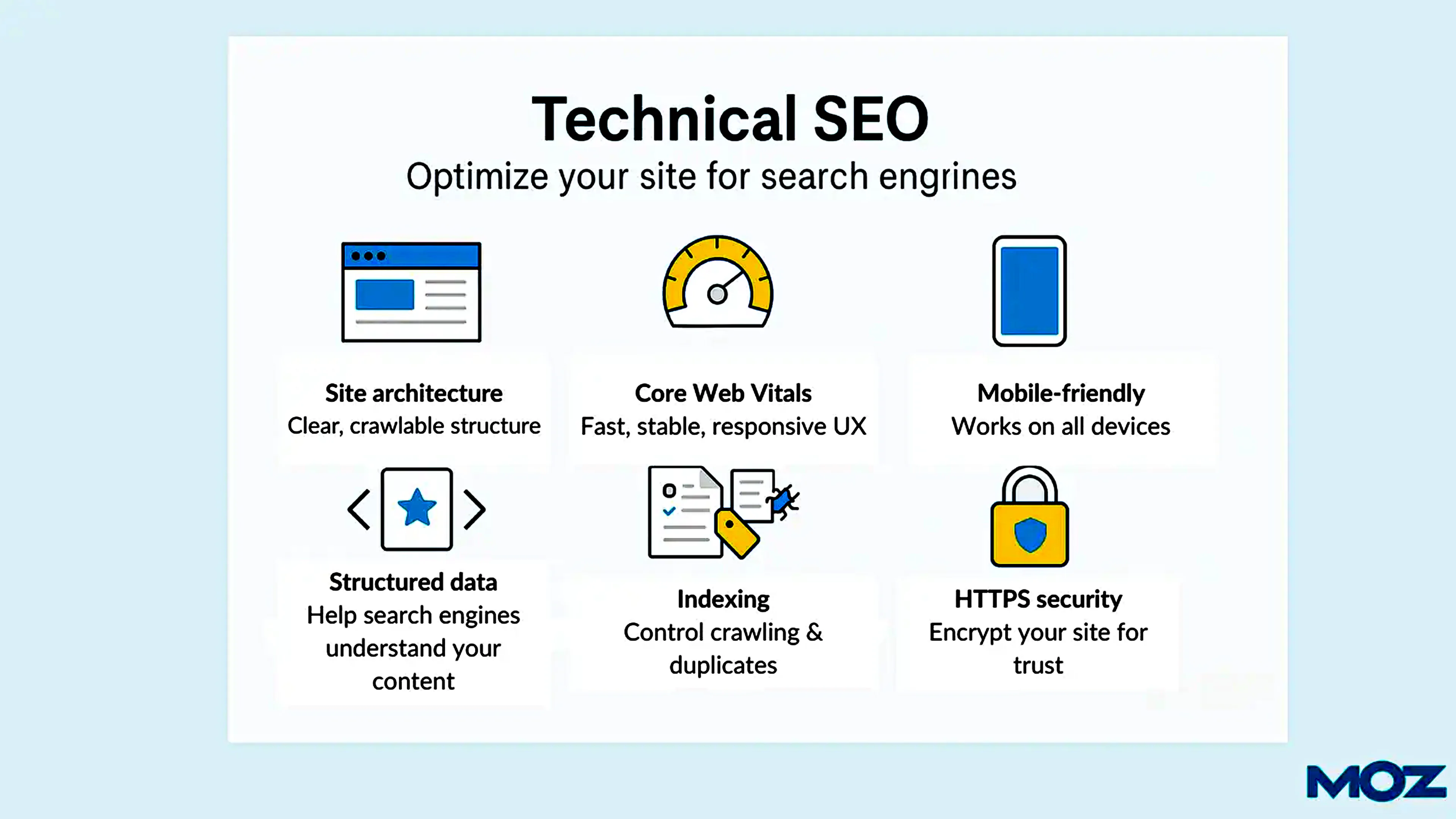
Page loading speed, responsiveness, and visual stability are non-negotiable SEO tactics: they help you rank, keep visitors calm on mobile, and make the path to “Book Now” feel effortless.
Targets:
- LCP < 2.5s, INP < 200ms, CLS < 0.1.
- Compress images (WebP), lazy-load galleries, and use responsive sizes.
- Optimize the booking widget—defer what you can, reduce third-party bloat.
- Fix 404 errors, redirect old URLs, and keep a clean sitemap.
Pro Tip: If a hero video is heavy, swap to a lightweight image on mobile.
Do this now (5 min):
- Convert the top room hero image to WebP and re-upload.
- Turn on lazy-load for gallery images (or add loading="lazy").
- Remove one unused script or widget from the page.
10) Booking UX and CRO (Turn Visitors into Players)
Getting found is step one—getting booked is the win. Clear pricing, obvious next steps, and fewer clicks turn interest into revenue, which is why smart SEO strategies always include conversion fixes alongside rankings. Make booking feel effortless and you’ll see the calendar move!
Priority focus areas:
- Sticky “Book Now” button on mobile and desktop.
- Clear pricing or price range, team size, and difficulty on every room page.
- Show time slots above the fold if possible.
- Use trust badges (reviews, “not actually locked in,” safety info).
- Add “Call us” and chat options for quick questions.
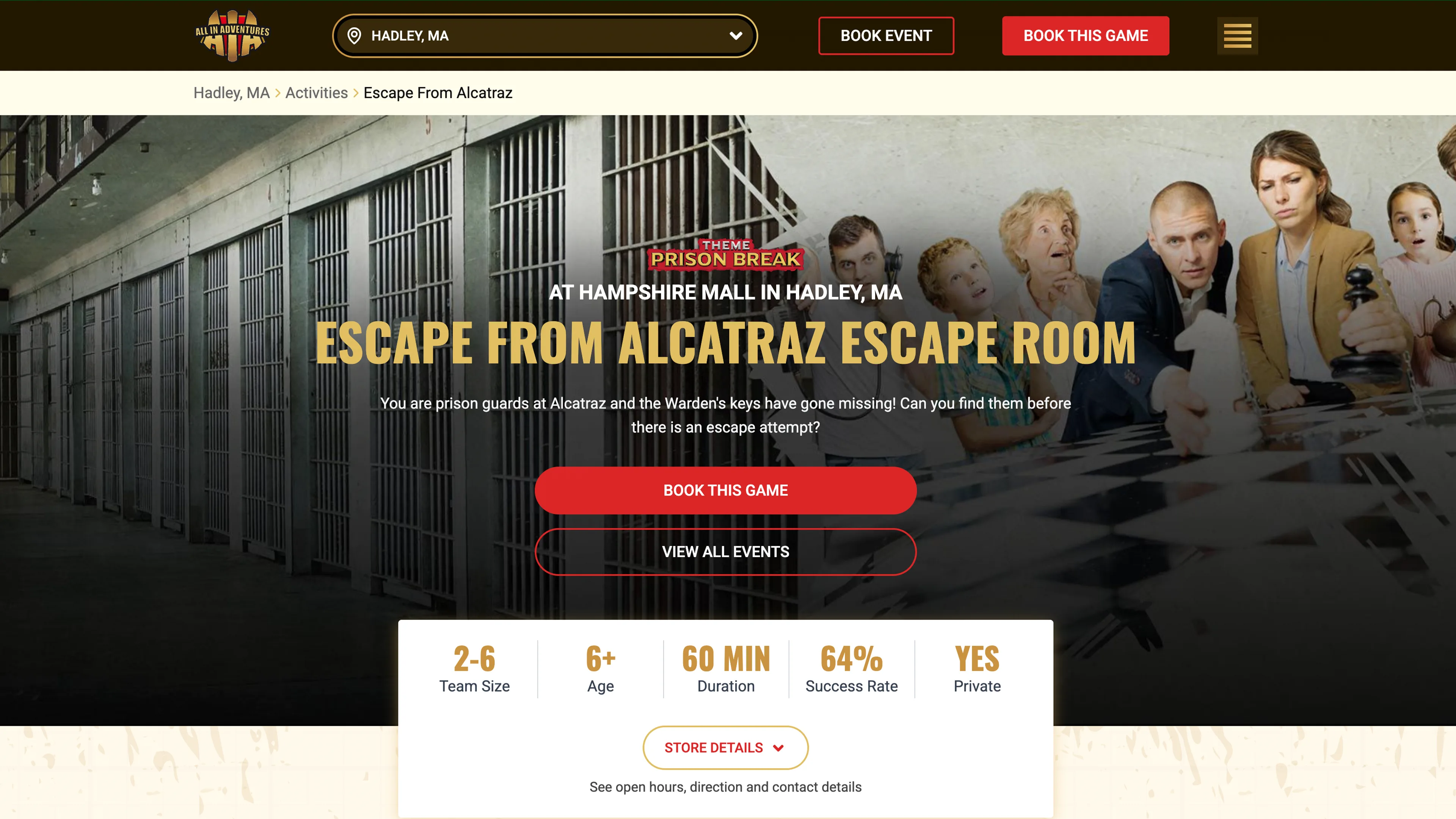
Pro Tip: Remove extra steps. The fewer clicks to book, the more sales.
Do this now (5 min):
- Make Book Now sticky on mobile.
- Move time slots above the fold on the best room page.
- Add a “Call us” link (tap-to-call) on mobile.
11) Measurement and a 90-Day Iteration Loop
What you track improves—and what you schedule actually gets done. A lightweight dashboard and a simple weekly routine keep escape room SEO moving forward without becoming a full-time job: check the key numbers, ship one meaningful improvement, and repeat.

Track weekly:
- Google Search Console: Queries, pages, and average position.
- Google Analytics: Organic sessions → bookings; conversion rate per page.
- Google Business Profile Insights: Website clicks, calls, direction requests.
- Reviews: New reviews and average rating.
90-Day Cycle:
- Ship one new/expanded page per week (rooms, events, FAQs).
- Earn one new local link per month.
- Add one fresh Google Business Profile Post weekly.
- Improve one Core Web Vital per month.
Pro Tip: Keep a simple SEO log: date, action, URL, expected outcome.
Do this now (5 min):
- Create a simple SEO log (Date | URL | Action | Expected outcome).
- In GSC, star Performance → Queries for “[escape room [city]]”.
- In GA4, check organic → booking goal exists (or note to add).
12) Multi-Location SEO (Scale Without Cannibalizing)
If you have multiple locations, the no. 1 mistake is letting pages compete with each other for the same keyword (e.g., three pages all targeting “escape room [city]”).
A clean structure tells Google which page should rank for which city—so each location wins its own searches.
Playbook
- One Google Business Profile per location with consistent naming: [Brand] – [City/Center].
- Location Hub listing all cities.
- One City page per location (unique intro, parking, landmarks, local photos).
- Room pages per city where experience differs; if identical across cities, keep content 60–70% unique (local photos, staff quotes, city details).
- Canonicals: avoid duplicate city/room combos; use canonicals only for true duplicates.
- NAP cleanup quarterly (Google, Apple Maps, Bing, Yelp/Tripadvisor).
- Internal links: city page ↔ city rooms ↔ city FAQ ↔ city pricing/booking.
Recommended URL & Nav Patterns:
- Locations hub: /locations/
- City page: /{city}/
- City rooms index (optional): /{city}/escape-rooms/
- City room: /{city}/escape-rooms/{room-slug}/
- City events: /{city}/events/{event-type}/ (e.g., /albany/events/corporate/)
Keep slugs short, lowercase, and consistent across the network.
Content to Localize per City (easy wins):
- 1–2 local photos (storefront, team wall, neighborhood landmark).
- Parking & directions from a known mall/road.
- Staff blurb (“Meet the Albany team”).
- Nearby spots (coffee, food) for post-game plans.
- 3–5 city-specific FAQs (age, parking, busy hours, public transit).
Common Pitfalls (and fixes):
- Pitfall: Copy-pasting the same City page to 10 locations.
Fix: Rewrite intros, swap photos, add local details/FAQs. - Pitfall: One national “Rooms” page for all cities.
Fix: City page lists only that city’s rooms; each links to its city-specific room page. - Pitfall: Homepage ranking for city terms (spreads authority thin).
Fix: Strengthen City pages with internal links, reviews, and localized content.
Do This Next:
- Standardize Google Business Profile names: [Brand] – [City/Center] for every location.
- Create a Locations hub and link it in the main nav/footer.
- Publish/refresh each city page with a unique intro, parking, local photos, and room cards.
Pro Tip: Set a monthly cadence—each month, fully localize one city (photos, FAQs, partner links). Within a quarter, your whole network will be stronger and non-cannibalizing.
Do this now (5 min):
- Standardize GBP name: [Brand] – [City] across locations.
- Add unique intro + parking note to one City page.
- Link City ↔ Rooms with a short rooms grid.
Read our detailed case study on how we redesigned the website of a leading multi-location escape room brand in the U.S.—boosting user engagement by 90% and increasing conversion rates by 82%.
13) Citations and Directories That Actually Help
Besides Google Business Profile, consistent listings on other major directories strengthen your local trust signals and send real referral traffic.
Keep your Name, Address, Phone, Hours, and URL (NAP+H) identical everywhere, and you’ll support Maps visibility and bookings.

Ready to grow your reach? Here’s where to list your escape room business.
- Core: Apple Maps, Bing Places, Facebook, Instagram, Tripadvisor, Yelp.
- Niche/local: Room Escape Artist, Every Escape Room, Tourism Board/CVB, Chamber, Downtown Alliance, nearby .edu/.org calendars.
- Rules: identical Name/Address/Phone/Hours/URL; match category; upload 3–5 real photos; add UTMs where allowed; review quarterly.
- Tracking sheet: Directory | Listing URL | Status | NAP match | Hours match | Photos | Last checked | Notes.
Pro Tip: Use the same 2–3 sentence description across all directories to avoid mixed signals.
Do this now (5 min):
- Claim/update Apple Maps and Bing Places.
- Copy a 2-sentence description you’ll reuse everywhere.
- Start a sheet: Directory | Listing URL | Last checked; add 3 rows today.
Small inconsistencies can hold you back!
Align your business details everywhere—so Google and your guests never get mixed signals. If it feels confusing, don’t stress—we’re always here to help you keep everything consistent.
Benchmarks and Targets (2025 Snapshot)
Think of this table as your scoreboard: simple, realistic goals to keep momentum and sanity intact. Use it to translate escape room SEO work into clear numbers—so you can spot wins, diagnose slowdowns, and adjust before weekends sneak up.
| Metric | Healthy Range/Avg | Your 90-Day Goal |
|---|---|---|
| GSC CTR (branded) | 20–40% | ≥30% |
| GSC CTR (non-brand local) | 4–12% | ≥8% |
| Avg position (core local terms) | 3–10 | Top 5 |
| LCP | <2.5s | <2.2s |
| INP | <200ms | <180ms |
| GBP actions/month | Baseline + | +20% |
| New reviews/month | 5–20 | 10+ |
| Organic → booking CVR | 2–5% | ≥4% |
| New local links/quarter | 1–3 | 3 |
Note: Your market may vary—use these as starting targets.
Do this now (5 min):
- Pick 3 goals for 90 days (e.g., +10 reviews/mo, Top-5 for “escape room [city]”, LCP <2.2s).
- Add them to the top of your SEO log.
- Schedule a 15-min weekly GBP routine on your calendar.
Owner Mistakes to Avoid
Nobody’s perfect—but these common mistakes quietly drain your rankings and bookings. Skim this list like a pre-flight check. If you spot one, fix it now and you’ll feel the lift fast: clearer pages, happier guests, and better local visibility.
- Keyword stuffing and over-optimization.
- Neglecting UX (slow pages, confusing navigation, weak mobile).
- Ignoring local SEO (GBP, citations, reviews).
- Doorway pages for micro-suburbs.
- Hiding prices (or ranges).
- Duplicate room content across cities.
- Heavy hero videos on mobile.
- Untracked booking widgets (no UTMs/goals).
- Orphan pages (no internal links).
- Letting reviews sit unanswered.
If any of these look familiar, don’t panic—pick one, fix it this week, then move to the next. Small, steady improvements beat big, rare overhauls.
For a deeper checklist, check out our guide on 5 common but costly escape room SEO mistakes.
Made a few SEO mistakes? That’s how every great business learns.
Fix one issue at a time, keep moving forward, and the results will come. If it ever feels overwhelming, don’t worry—we’re here to help you refocus, rebuild, and get your growth back on track!
Escape Room SEO FAQs
Got questions? You’re not alone—these are the things owners ask most when putting SEO into practice: timelines, pages per room, GBP, reviews, schema, and how to track wins.

Skim the answers now, then keep this section as your quick field manual whenever you hit a snag.
Q. What if my competitor escape room businesses outrank me?
A. Check their content depth, GBP reviews, and local links. Then out-help them: better guides, more reviews, faster site, stronger partners.
Q. Is it safe to use AI for writing pages?
A. Use it for drafts and outlines only. Add human experience—original photos, real capacity/pricing, your staff voice, local details, case results, and safety notes—so the content shows real-world expertise (that’s what Google rewards).
Q. What about image and video SEO—does it move the needle for escape rooms?
A. Yes. Export images to WebP, compress them, and write descriptive alt text like “Wizarding School escape room in Albany—2–8 players.” Host short clips on a fast platform (or YouTube) and embed them with a transcript/summary to help both speed and relevance.
Q. Should I add review schema to get stars in results?
A. Use LocalBusiness and Product (for rooms) carefully and follow Google’s policies—don’t mark up third-party reviews you don’t control. Focus first on getting more GBP reviews; they influence local pack visibility more than star snippets on organic listings.
Q. How do I measure bookings from Google Maps vs regular Google search?
A. Add UTM parameters to GBP Website and Booking links, use call tracking for the GBP phone number, and review GBP Insights (calls, website clicks, directions). Pair that with GA4 goals for bookings to see which channel fills which time slots.
Q. How should I handle seasonal rooms or temporary events without hurting SEO?
A. Publish them as Event or Room pages with clear dates; when they end, keep the URL live with an “Archived” note and internal links to current rooms—or 301 to the closest match. Don’t hard-delete popular URLs; preserve any links and rankings they earned.
Q. What if competitors spam the map with fake locations or suspicious reviews?
A. Document everything (screenshots, dates, profile links), then report via the Business Redressal Form and the “Suggest an edit” flow. Meanwhile, out-help them: strengthen your GBP, collect real reviews, earn local links, and keep publishing helpful content—Google tends to reward the most useful result over time.
Q. How long until I see results?
A. If your basics are solid, local terms can move in 4–12 weeks. Competitive terms and multi-location efforts take longer. Consistency wins.
Q. Should I list prices?
A. At least show a price range. Hidden pricing reduces conversions and hurts trust.
Q. Do I need blog posts?
A. Yes, but only helpful ones. Start with “Corporate Team Building in [City]”, “Escape Room Birthday Guide”, and a big FAQ page.
Q. What’s the biggest technical mistake in Escape Room SEO?
A. Heavy pages and slow booking widgets. Compress images and streamline scripts.
Q. How do I track success?
A. Watch GSC queries, organic bookings, GBP actions, and reviews per month. If bookings rise, your SEO is working.
Final Thoughts
The path to becoming your city’s leading escape room brand isn’t a mystery—it’s a method. When you master the basics—fast pages, strong Google Business Profile, consistent reviews, and clear booking flows—and repeat them every week, the results build on themselves.
Keep moving forward with this 90-day plan, track a few simple metrics, and you’ll start seeing the impact right on your booking calendar. Even small steps—like adding GBP Products for each room or publishing one new event page—can spark lasting growth.
Stay consistent, trust the process, and watch your visibility, rankings, and bookings rise—until your escape room becomes the #1 go-to brand in your city.
Ready to lead your market? Get your personalized escape room SEO plan from Escape Room Marketer and start turning searches into bookings TODAY!
You’ve already started your journey—now keep the momentum.
Stay consistent, measure your wins, and celebrate small steps. When you’re ready for expert support, book a free consultation—we’re always here to help you grow.